

Description
Product Table for WooCommerce & Elementor replaces the standard product grid with a structured table layout built natively inside the Elementor editor. Customers can search, filter, compare, and add multiple products to the cart in one click — without leaving the page.
Built for stores where buyers know what they want and need to order fast: B2B wholesale, trade suppliers, office supplies, spare parts, food service, and digital product libraries.
Two Elementor widgets are included: a Product Table widget and a companion Product Table Filter widget. Place the filter anywhere on the page — above, beside, or in a sidebar — and connect it to any table by ID.
⚡ Bulk Ordering
The feature most WooCommerce stores are missing. Customers check boxes next to any combination of products, adjust quantities per row, and click one button to add everything to the cart at once. The cart mini-widget updates instantly without a page reload.
- Per-row quantity inputs with min/max stock awareness
- Select-all checkbox in the table header
- Customizable “Add Selected to Cart” button text
- Cart fragment refresh — no page reload required
🔍 Live AJAX Filtering
The companion Filter widget sends a server-side query and updates the table body without reloading the page. Every filter works for logged-in and guest users alike.
- Search — keyword search across product data
- Category — multi-select category dropdown
- Price range — min and max price inputs
- Product attributes — choose which WooCommerce attributes to expose (color, size, material, or any custom attribute)
- Reset button — clears all filters and reloads the full product set
- Server-side pagination with Previous / Next controls
📋 Choose Your Columns
Build your table from over 25 field types using a drag-and-drop column builder. Every column has an optional custom header label — call it “Part No.” instead of “SKU”, or “Buy” instead of “Add to Cart”.
Available column types:
- Product Title (links to product page)
- Product Image (with image size control)
- Price / Regular Price / Sale Price
- Add to Cart button
- Quantity input
- Quick View popup
- SKU
- Stock Status (with color-coded badge: In Stock / Out of Stock / On Backorder)
- Stock Quantity
- Category / Tags
- Rating (star display) / Average Rating / Number of Reviews / Rating Count
- Description (short description, word-limited)
- Attributes
- Total Sold
- Backorder Allowed / Manage Stock / Sold Individually
- Downloadable / Download Limit / Download Expiry
- Product ID
- Any custom meta field (automatic fallback for custom fields not in the list above)
📤 CSV Export
A single button lets customers download the current visible table as a CSV file. Works with the current filtered and sorted state — the exported rows match exactly what is on screen. No server round-trip. Useful for procurement, quotes, and internal ordering workflows.
🎨 Full Elementor Style Control
Everything is styled inside the Elementor editor — no CSS required.
- Table Header — background color, text color, alignment, typography, border, padding
- Table Rows — zebra stripe colors (odd and even rows independently), typography, border, padding
- Highlighted Columns — mark any column with a distinct background and text color to draw attention to price, stock status, or any other field
- Out-of-stock dimming — automatically reduces opacity on rows where the product is out of stock
- Sticky header — column headers follow the user as they scroll, with configurable offset for fixed navigation bars
- Entries dropdown — optional “Show 10 / 25 / 50” control
- Pagination — built-in page controls with configurable default page length
🔧 Two Elementor Widgets
Product Table — the table itself.
- Filter initial product set by category
- Set total product count
- Sort by: Date, Title, Price, Sales, Rating, SKU, Stock Status, Menu Order, Random, and more
- All styling controls in the Style tab
Product Table Filter — standalone filter panel, place anywhere.
- Link to any Product Table by widget ID
- Toggle each filter type on or off independently
- Choose which WooCommerce product attributes appear as filter dropdowns
- Customizable Apply and Reset button labels
🏪 Who Uses This Plugin
Wholesale & B2B stores — buyers place full orders in one session without clicking through individual product pages.
Trade suppliers & distributors — SKU-first ordering where the buyer already knows the part number.
Office & facility supplies — recurring orders across many product lines.
Spare parts & components — technical buyers who filter by attribute (voltage, thread size, material) before ordering.
Food service & hospitality — weekly ordering from a structured product list.
Digital product libraries — list downloadable products with license terms, download limits, and expiry in a clear table.
Restaurant takeaway & menus — item-by-item selection with a single checkout action.
Screenshots

Product Table displayed on the frontend with image, price, stock badge, quantity input, and individual Add to Cart buttons. 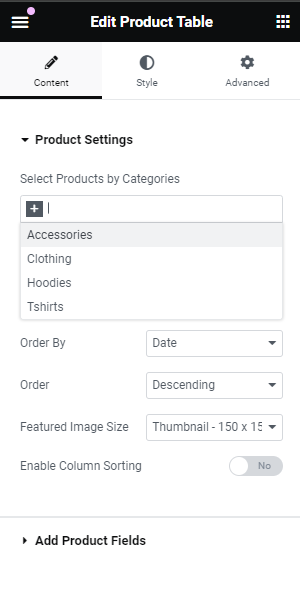
Bulk ordering — customers select multiple rows and add everything to cart in one click. 
Product Table Filter widget with category, price range, and attribute dropdowns connected to a table.
Installation
- Upload the plugin folder to
/wp-content/plugins/or install through the WordPress Plugins screen. - Activate the plugin.
- Ensure WooCommerce and Elementor (free version is sufficient) are installed and active.
- Open any page in the Elementor editor.
- Search for Product Table in the widget panel — it appears under the “WooCommerce Product Table” category.
- Drag the widget onto the page, choose your columns, and publish.
To add filtering, drag the Product Table Filter widget onto the page, copy the Product Table widget’s HTML ID from Advanced CSS ID, and paste it into the Filter widget’s Target Table ID field.
FAQ
-
Does this require Elementor Pro?
-
No. The plugin works with the free version of Elementor.
-
Does it work for guest / non-logged-in visitors?
-
Yes. Filtering, bulk add to cart, and quick view all work for both logged-in and guest users.
-
Can I show variable products in the table?
-
Yes. Variable products display an “Select options” link that takes the customer to the product page to choose their variation before adding to cart.
-
How does the Filter widget connect to the Product Table widget?
-
Open the Product Table widget in Elementor, go to Advanced CSS ID, and copy the value shown there (format:
ptew-product-table-{id}). Paste that value into the Filter widget’s “Target Table ID” field. -
Can I have multiple tables on one page?
-
Yes. Each table is independent. You can place multiple Product Table widgets on the same page, each with its own column set, product source, and connected Filter widget.
-
Can I rename column headers?
-
Yes. Each column in the column builder has an optional “Column Header Label” field. Leave it blank to use the field name, or type any custom label.
-
Does the CSV export include filtered results only?
-
Yes. The export downloads exactly the rows currently visible in the table, reflecting any active sort or filter state.
-
How does bulk add to cart handle quantities?
-
Each row has an optional Quantity column. When a customer selects products and clicks the bulk cart button, the quantity from each row’s input is sent to the cart. If no Quantity column is present, each selected product is added with a quantity of 1.
-
Is the plugin translation ready?
-
Yes. All user-facing strings are wrapped in WordPress translation functions and the plugin is fully compatible with translation plugins and
.po/.molanguage files. -
Does it work with WooCommerce HPOS (High-Performance Order Storage)?
-
The plugin reads product data only — it does not interact with order storage — so it is fully compatible with HPOS enabled or disabled.
Reviews
There are no reviews for this plugin.
Contributors & Developers
“Product Table for WooCommerce & Elementor – Bulk Order Form” is open source software. The following people have contributed to this plugin.
Contributors
Translate “Product Table for WooCommerce & Elementor – Bulk Order Form” into your language.
Interested in development?
Browse the code, check out the SVN repository, or subscribe to the development log by RSS.
Changelog
0.7
- New: Product Table Filter widget — standalone Elementor widget with category, price, attribute, and keyword filters.
- New: Server-side AJAX pagination — handles catalogues of any size without loading all products at once.
- New: CSV export button — downloads the current visible table rows as a .csv file.
- New: Custom column header labels — rename any column independently of its field type.
- New: Out-of-stock row dimming — visually reduces rows where products are unavailable.
- New: Stock Status color badge — In Stock (green), Out of Stock (red), On Backorder (amber).
- New: Reset Filters button on the Filter widget.
- Fixed: AJAX filter was broken for guest (non-logged-in) users — nopriv hook was missing.
- Fixed: Bulk add to cart now correctly reads per-row quantity inputs.
- Fixed: Unescaped output in Quick View modal (security fix).
- Fixed: Widget settings are now retrieved from a server-side transient instead of being passed through POST data.
- Fixed: WC_Product_Query used consistently throughout — no more visibility bypass via raw WP_Query.
- Fixed: DataTables assets now load only on pages containing a widget, not site-wide.
- Fixed: aria-sort attributes now update correctly after column sort interaction.
- Fixed: Duplicate alt attribute on product images.
- Fixed: Deprecated Elementor Scheme_Color and Scheme_Typography imports removed.
0.6
- Fixed Tested Up To value for WordPress 6.8.
- Added translator comments to all strings containing placeholders.
- Used $wpdb->prepare() for all direct database queries.
0.5
- Added semantic HTML and ARIA attributes for accessibility.
- Replaced WP_Query with WC_Product_Query for correct WooCommerce product visibility.
0.4
- Optimised database query with JOIN and DISTINCT for better performance on large catalogues.
- Moved asset enqueuing to Elementor dependency methods for conditional loading.
- Added 12-hour transient cache for product meta key query.
0.3
- Optimised ptew_fetch_product_meta_keys().
0.2
- Fixes from WordPress plugin review team.
0.1
- Initial release.